Google Local Services Ads Explained: How They Work, What They Cost and the New Missed-Call Charges
Short on time? Summarize this post with AI:
Or share it with someone who needs it:
If you search "plumber near me," "dentist near me" or "divorce lawyer near me," the first thing you'll often see isn't a website or a map. It's a row of sponsored businesses with star ratings and buttons to call or book. Tap one, and there's a badge: Verified, "This business has been verified by Google."
Those are Local Services Ads. For a lot of local businesses, they're the most valuable real estate on Google. And as of October 1, 2026, Google changed how they charge for them: missed calls can now cost you money.
So let's cover everything: what Local Services Ads are, how they work, what Google requires, who they're good for, what they cost, and exactly what changed.
The short version
- Local Services Ads charge per lead, not per click. You pay when someone calls, messages or books you through the ad.
- They show at the top of Google, above regular ads and the map, with your rating, and a Google Verified badge on your profile.
- Google screens you first: license, insurance, background checks and more, depending on your industry.
- They work best for local service businesses like home services, dentists, lawyers, real estate agents and more. Google publishes the full list of eligible categories.
- Leads typically cost anywhere from about $30 to $200+, depending on your industry and city.
- New as of October 1, 2026: missed calls during business hours are charged if the caller stays on the line more than 20 seconds. Answering your phone is now a billing issue, not just a sales issue.
What are Local Services Ads?
Local Services Ads (LSAs) are a Google ad product built for local service businesses. Google says they "feature prominently in Google Search results," at the top of the page, and that "you only pay when potential customers get in touch through your ads." (Google — Local Services Ads)
That's the big difference from regular Google Ads:
- Regular Google Ads are pay per click. Someone clicks your ad, you pay, whether they ever call or not.
- Local Services Ads are pay per lead. You pay when a potential customer actually contacts you: a phone call, a message or a booking request. (Google Local Services Help — Getting started)
Here's what that looks like. This is a real search I ran for "plumber near me" from Ringwood, NJ:
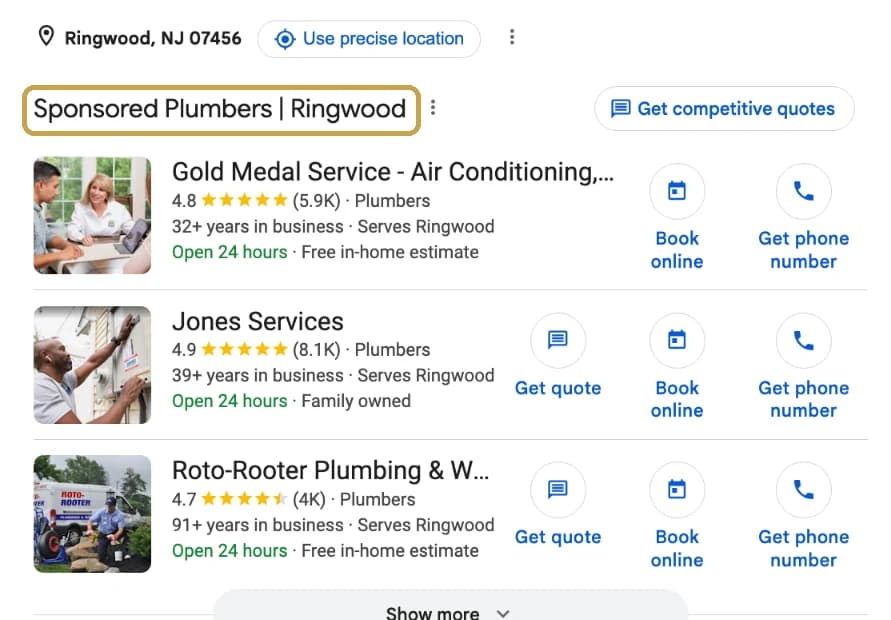
There are no keywords to pick and no ad copy to write. Google builds the ad from your business profile, your services, your service area and your reviews. (If you're deciding between the two ad types, I wrote a whole comparison: Local Services Ads vs. Google Ads.)
Why Google created them (a little history)
Local Services Ads started life in 2015 as Google Home Service Ads, a test with plumbers and locksmiths in the San Francisco Bay Area. (Search Engine Land — Google Home Services ads beta) By the end of that year, Google was expanding it to more cities and categories. (CNBC — Google plays matchmaker, expands home services ads)
The problem Google was solving was simple: when someone needs a plumber at 10pm, they don't want to research ten websites. They want someone nearby, trustworthy and available, right now. So Google started vetting businesses itself and putting the vetted ones at the top.
Here's how it's evolved:
- 2015: Home Service Ads launch for plumbers and locksmiths.
- Later years: renamed Local Services Ads, expanded to dozens of categories and cities, and joined by the green-check Google Guaranteed and Google Screened badges. (Search Engine Land — Google Home Services expands)
- Late 2025: both badges were replaced by a single Google Verified badge, and Google ended the old money-back guarantee. (Google Local Services Help — Google Verified badge)
- 2023: dentists were added as a category in the US. (Search Engine Roundtable — Google Local Service Ads adds dental practices)
- August 2026 onward: LSAs start moving into Google Ads as Performance Max campaigns with pay-per-lead goals. (More on that below.)
- October 1, 2026: missed-call and follow-up-call charges begin.
Why they're good (when they fit)
- Top of the page. You show up above everyone else for "near me" style searches.
- You pay for conversations, not clicks. No paying for someone who looked and left.
- Trust, borrowed from Google. The Google Verified badge tells people Google checked you out.
- Simple to run. No keywords, no landing pages, no ad copy.
- Your reviews are front and center, which rewards businesses that actually do great work. (Here's what your star rating needs to be.)
What Google requires to get verified
This is the part that scares people off, and honestly, it's also why the leads are good. Not everyone can get in. Pass, and this is what customers see when they tap your ad:
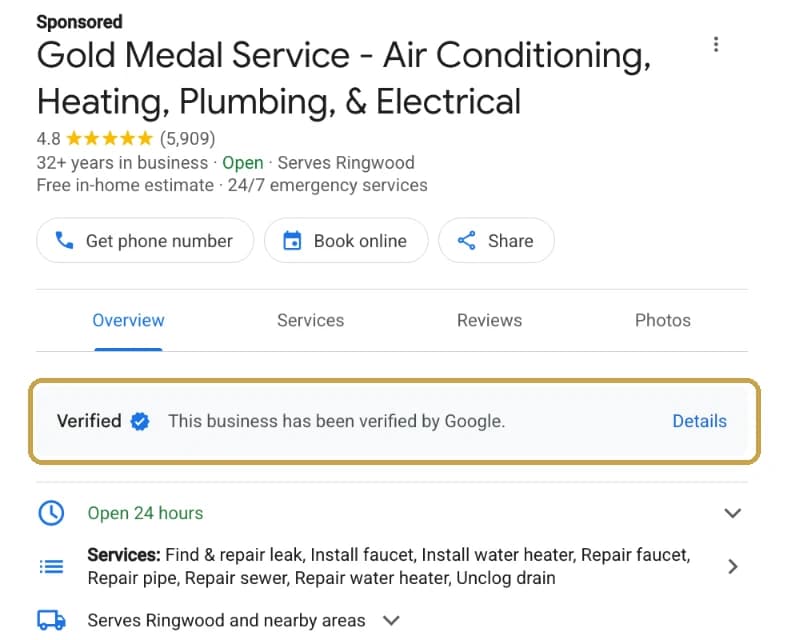
According to Google, the checks depend on your industry and location, but can include (Google Local Services Help — Screening and verification):
- Background checks on the business owner and, in some categories, field workers. Google describes them as "identity and criminal history checks." Google notes "businesses aren't charged for the background check."
- Business registration. In the US, a D-U-N-S® number or other documents like your Secretary of State filing or EIN. Getting a D-U-N-S number can take "up to 30 days."
- Google Business Profile verification. Your profile has to be verified and connected.
- License checks. "Google verifies that businesses hold applicable state, provincial, or country-level licenses."
- Insurance checks for certain categories. The document must be "active and valid for at least 14 days after submission."
- Advanced verification for some categories, which "combines a review of your Google Ads account, publicly available data, and video interviews."
My honest advice: gather everything before you start. License numbers, insurance certificates, your EIN and D-U-N-S number, and a list of everyone who'll need a background check. Most verification delays I see are a missing document, not a failed check.
How Local Services Ads rank
Not every verified business shows up first. Google says ranking depends on your bid, how likely you are to get the lead, and your profile quality, including "your rating, number of reviews, average response time, use of high-quality images, the verification checks you have completed." It also lists "your responsiveness to customer inquiries." (Google Local Services Help — About ad rankings)
And Google is blunt about this one: "if you regularly fail to answer calls or respond to messages, your ad ranking may be affected." (Google Local Services Help — Getting started)
So the formula is: great reviews, a complete profile and fast responses. Notice that answering the phone was already a ranking factor long before the new billing change.
Who are Local Services Ads good for?
Google lists categories across home services, business services like legal and real estate, healthcare, learning, care, wellness, beauty and automotive. (Google — Local Services Ads)
Is your business eligible? Google says "Local Services Ads are available only for certain service categories," and it keeps the official, up-to-date list on its Local Services Ads Help page for the US. The quickest way to check: open that page, press Ctrl+F (Cmd+F on a Mac), and type your business type.
Here's how Google's US list breaks down, as of October 2026:
| Industry | Examples of eligible categories |
|---|---|
| Home services | Plumbers, electricians, HVAC, roofers, general contractors, handymen, painters, kitchen and bathroom remodeling, flooring, garage doors, locksmiths, pest control, house cleaning, landscaping and lawn care, tree services, water damage, moving, junk removal, pool, solar and more |
| Legal | Personal injury, family, criminal, DUI, estate, immigration, bankruptcy, business and real estate lawyers, and more |
| Health | Dentists, orthodontists, chiropractors, optometrists, physical therapists, podiatrists, dermatologists, primary care physicians and more |
| Auto | Auto repair, body shops, auto glass, tire shops, oil change, towing, car washes and detailing |
| Real estate and finance | Real estate services, financial planning, tax services |
| Pets | Veterinarians, pet grooming, boarding and training |
| Beauty and wellness | Hair and nail salons, barber shops, massage therapists, personal trainers, yoga studios |
| Learning and care | Tutors, driving and language instructors, preschools, child care |
| Restaurants and food | Dozens of restaurant, coffee shop and bakery categories |
A few categories (like architects and interior designers) are only available in California and Florida, and availability can vary by city. Google confirms what's open in your exact area when you sign up.
They tend to work best for:
- Urgent home services: plumbers, HVAC, electricians, locksmiths, roofers, water damage, garage doors, pest control.
- Recurring home services: cleaning, landscaping, painting, handyman, junk removal.
- Dentists: Google added dental practices in 2023, and it's one of the categories where I see LSAs make a lot of sense: someone searching "dentist near me" is usually ready to book. Two healthcare notes from Google: booking leads aren't available for healthcare (Getting started), and automatic credits for low-quality leads don't apply to healthcare (How leads work). (Run a dental practice? Dental SEO Pros is built for you.)
- Lawyers: personal injury, family law, criminal defense, estate planning, immigration and more.
- Real estate agents and other local professionals.
They're a weaker fit if your category isn't eligible in your area, you can't pass verification yet, or nobody reliably answers your phone (keep reading).
What do Local Services Ads cost?
You pay per lead, and the price depends heavily on your industry, your city and your competition. These are ballparks from agencies that publish their numbers, not Google's official prices:
| Industry | Ballpark cost per lead |
|---|---|
| Cleaning, painting, junk removal, handyman | ~$33–$39 (99 Calls) |
| Electrical | ~$43 (99 Calls) |
| Plumbing | ~$66 (99 Calls) |
| Roofing | ~$107 (99 Calls) |
| Water damage restoration | ~$215 (99 Calls) |
| Dentists | ~$106–$119 when dental launched in 2023 (Search Engine Roundtable); varies a lot by city |
| Family law | ~$71–$107 (Rankings.io) |
| Personal injury law | ~$150–$225 (Rankings.io) |
For an overall benchmark, WordStream puts the average Local Services Ads cost per lead at "about $60." (WordStream — Google Local Services Ads)
You set a budget, and Google bills you for valid leads. Some things aren't charged, like leads that come in outside your business hours, people asking for advice instead of a service, and canceled bookings. Google may also credit leads its systems later decide were low quality, and you can report bad leads through its feedback survey. (Google Local Services Help — How leads work)
Is $66 a lot for a plumbing call? Only if you don't book the job. If a typical job is worth $400 and you book one out of every three leads, each job costs you about $200 to win. That's the math that matters. Track it.
🚨 What changed on October 1, 2026: Google now charges for missed calls
This is the big one, and a lot of business owners haven't heard about it yet.
Google emailed Local Services advertisers: "On October 01, 2026, we are updating how and when you are charged for call leads originating from Local Services Ads." (PPC Land)
Here's what changed, in Google's words (Search Engine Roundtable):
1. Missed calls can be charged. "Missed calls during business hours will now be charged as valid leads if a user stays on the line for more than 20 seconds."
2. Phone menus get a pass on the wait. "If your call-receiving setup requires customers to press a key to route them to the relevant department, then the 20 second-timer will start once customers press the key."
3. Follow-up calls can be charged. "If an initial call doesn't qualify as a charged lead, any follow-up calls between your business and the user that meet the valid lead criteria will be charged."
Google's Ads Liaison, Ginny Marvin, clarified that last one: "The advertiser will only be charged 1x for any follow-up calls they make to the user within 15 days of the initial interaction." After 15 days, a new call can count as a new lead. (Search Engine Roundtable)
Why Google is doing this
Think about it from the customer's side. They found you at the top of Google, tapped "call," and sat through ring after ring. Google's reasoning is that customers "expect to connect quickly with a trusted local professional," and the change rewards "businesses that provide excellent responsiveness." (PPC Land)
Translation: Google delivered the customer to your door. If you didn't open it, that's on you now.
What to do about it (this week)
- Answer within 20 seconds. That's about four or five rings. Whoever answers the phone needs to know this.
- Double-check your business hours in your Local Services profile. Leads outside your listed hours aren't charged, so make sure your hours are the hours someone's actually answering.
- Have a backup. If the front desk is busy, calls should roll to a second person, a call center or an answering service. AI answering tools are getting good at this too.
- Call back fast. A missed call you return is now a lead you're paying for either way, so make it count. Every minute matters (here's why speed to lead wins jobs).
- Review your leads weekly. Listen to recordings, check what you were charged for, and report the bad ones.
Radically transparent take: I actually think this change is fair. Paying for a call you missed stings, but the businesses that pick up the phone were always going to win. This just puts a price tag on the ones that don't.
The other big change: Local Services Ads are moving to Performance Max
Google is also moving Local Services Ads into regular Google Ads as Performance Max campaigns with pay-per-lead goals. It started in August 2026 for select US home and storefront service categories, with wider rollout in late 2026 and other countries in 2027. (Google Ads Help — Local Services Ads transition)
What stays the same: you still pay per lead, and there are still no keywords. What changes: you'll manage it inside Google Ads, budgets move from weekly to daily, and "manual bidding (such as setting a maximum cost-per-lead) is no longer supported."
My advice: export your lead history and reports now, before your account migrates, so you have a clean before-and-after.
Local Services Ads aren't the whole plan
LSAs are rented space. When you stop paying, you disappear from the top of the page. That's not bad; it's just how ads work.
The businesses that do best use LSAs alongside things they own:
- A strong Google Business Profile and steady reviews, which help both your ads and the free map results. (How to Get More Google Reviews)
- SEO, so you show up in the free results too. (How to Get Found Online)
- A phone system and a team that answers, which was always the real secret, and now it's also a line item.
Your next step
If you run Local Services Ads, look at your last 30 days of leads today and ask one question: how many calls did we miss? That number is now money.
If you're not sure whether Local Services Ads are right for your business, or you want help building the reviews and visibility that make them work better, JDS1 Marketing offers a Visibility Snapshot, or you can book a call with me. And yes, I'll pick up in under 20 seconds.
Pass it on
Know someone who needs this?
Send it to one business owner who's been wrestling with this. It takes five seconds, and it might save them months. That's being kind to their future business.
Want a caption? Here's one, ready to paste:
Google Local Services Ads Explained: How They Work, What They Cost and the New Missed-Call Charges Pay per lead, not per click. The Google Verified badge. Top of the page. And as of October 1, Google charges for missed calls. Here's everything a local business needs to know. Worth the read 👇 https://brentnickles.com/blog/local-services-ads
Tip: on LinkedIn, add one sentence of your own take above it. That's what starts the conversation.
Keep reading
Local Services Ads vs. Google Ads: Which One Should a Local Business Run?
One charges per lead, the other per click. Here's how I decide which one a local business should start with — and what Google is changing this year.
Is SEO Right for My Business? What to Invest at Every Revenue Stage
SEO isn't one thing at one price. What a $400K business needs is completely different from a $4M one. Find your stage, and see what SEO should do for you.